How to Run Ethernet Cable Between Floors Without Ripping Up Your House
Zak
21 November 2026
→ Let Us Run the Cables, Book a Free Survey
Running a cable along one floor is easy. Getting it from downstairs to upstairs is where most DIY jobs stall. The router is in the hall, the office is in the back bedroom, and there's a floor, a ceiling and a lot of plaster in the way.
Here are the routes that work in typical UK houses, and how to drill through floors safely.
Key Takeaways
- Look for an existing route first: pipes, the airing cupboard, or a boxed-in soil pipe
- The loft is your friend. Go up from the top, not down from the bottom
- Drill joists in the middle of their depth, never notch the bottom edge
- Use a cable and pipe detector before every hole
- Restore any fire-stopping you break through, especially in flats
- An outside route in conduit is fine if there's no inside one
Route 1: Follow the Pipes
Most houses already have holes between floors: where the central heating pipes, waste pipes or the soil stack go through. The airing cupboard is often the easiest of all, because the pipes run straight from the boiler or cylinder up to the loft.
Feed the cable alongside the pipes, keeping it clear of anything hot, and you've crossed a floor without drilling a new hole.
Route 2: Come Down From the Loft
For upstairs rooms, it's almost always easier to start in the loft and drop down into a stud wall or the corner of a room. From the loft you can see where the wall plates are, drill straight down into the cavity, and drop the cable with a weighted line or cable rods.
The loft is also the best place to run cables for ceiling WiFi access points upstairs. Each one needs just a small hole through the ceiling.
Route 3: Inside a Cupboard or Behind Boxing
Built-in wardrobes, under-stair cupboards and boxed-in pipes make great hiding places. A cable running vertically inside a cupboard, or behind a removable boxing panel, is invisible once the door is shut.
Route 4: Outside the House
If there's no sensible inside route, going outside is a perfectly good option:
- Drill out through the wall at the router end
- Run up the outside wall in a small UV-resistant conduit, alongside a downpipe where it's tidiest
- Drill back in at the room or the loft
Use outdoor-rated cable for any part that's outside. Seal both holes with silicone or a proper grommet so water can't run in, and angle the hole slightly downwards towards the outside.
Drilling Through Joists Safely
Between floors, cables cross the floor joists. These hold up the floor, so drilling them carelessly can weaken them. The rules of thumb from UK building guidance:
- Drill holes in the middle of the joist's depth, where it's under least stress
- Keep hole diameter to no more than a quarter of the joist's depth
- Drill between a quarter and 40% of the span in from the wall it sits on, not in the middle of the room
- Keep holes at least three hole diameters apart
- Avoid notching. If you must, only notch the top edge, close to the wall, and no deeper than an eighth of the joist depth
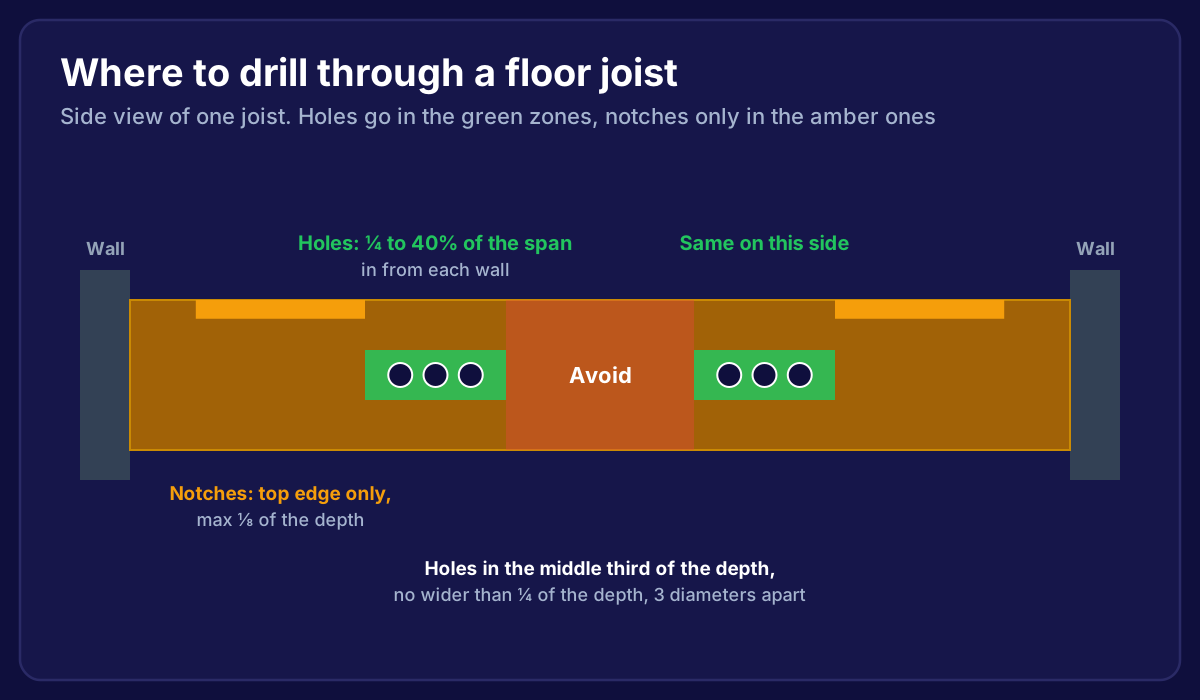 Side view of a floor joist showing where to drill cable holes, between a quarter and 40% of the span from each wall in the middle of the depth, and where small notches are allowed on the top edge
A 20 mm hole is plenty for two Cat6 cables, so you'll rarely get near these limits. Engineered joists (I-joists or metal web joists) have their own rules, so check the manufacturer's guidance first.
Before Every Hole: Check What's Behind It
- Use a cable and pipe detector on walls and ceilings
- Remember mains cables often run vertically above and below light switches and sockets, and horizontally near the ceiling
- Lift a floorboard to look before drilling up through a ceiling from below
- Turn the power off to that circuit if you're drilling near a light fitting
Don't Forget Fire-Stopping
Floors between storeys slow down the spread of fire. Every hole you make through a floor or ceiling needs to be sealed again afterwards, using fire-rated sealant or a fire-rated grommet.
This matters most in flats and loft conversions, where the floor may be a fire separation between homes or between a bedroom and an escape route. If you're not sure, ask before you drill.

What About Solid Floors?
Many ground floors are concrete. You can't run cables under them, so the options are:
- Surface trunking along the skirting, painted to match the wall
- Chasing a channel into the wall plaster for a vertical drop (messy, but invisible once filled)
- Going up and over through the ceiling void of the floor above, then dropping down inside a wall
For more on the whole job, read how to install ethernet cable in your house.
Frequently Asked Questions
Can I run ethernet cable under carpet?
Short flat cables under a rug are fine for temporary use. For a permanent run, it gets walked on and wears through. Run it under the floorboards or in trunking instead.
Do I need building regs approval to drill joists for a cable?
Not for a normal cable hole within the guidelines above. Notifiable work is about structural changes, not a 20 mm hole for a data cable.
Is powerline a good alternative?
Sometimes. Powerline adapters send data over your mains wiring, and speeds vary a lot from house to house. A real cable is faster and more reliable every time.
What size hole do I need?
About 10 mm for one Cat6 cable on its own, and 20 mm for two. Plugs don't fit through small holes, which is one reason we fit sockets at each end rather than pre-made leads.
Want the cables run and nobody lifting floorboards but us?
We find the routes, drill safely, restore fire-stopping and leave every cable hidden. Then we fit WiFi access points where they'll make the biggest difference. One fixed price, every room tested, and if it isn't fixed, you don't pay.
→ Book Your Free Home Network Survey
Or talk to a local installer about your home.