WiFi 7 Access Point Installation: Why It Matters for Your Home Network
Zak
21 November 2026
→ Get WiFi 7 Installed Properly, Book a Free Survey
WiFi 7 is the fastest WiFi you can buy. But most people meet it as a new router from their provider, sitting in a cupboard by the front door. In that spot, the rooms at the back of the house barely notice the difference.
The WiFi 7 features that matter most, like the 6 GHz band and Multi-Link Operation, only help if the signal reaches you strongly. That's what a properly installed access point does.
Key Takeaways
- An access point is the part that makes the WiFi. Where it goes matters more than its spec
- WiFi 7's fastest band, 6 GHz, is the most easily blocked by walls and floors
- Mount access points on the ceiling, in the middle of the area they cover
- Connect each one with a cable, not a wireless hop from another box
- Most WiFi 7 access points need PoE+ power and a 2.5 Gbps port
- A typical house needs one access point per floor, sometimes more
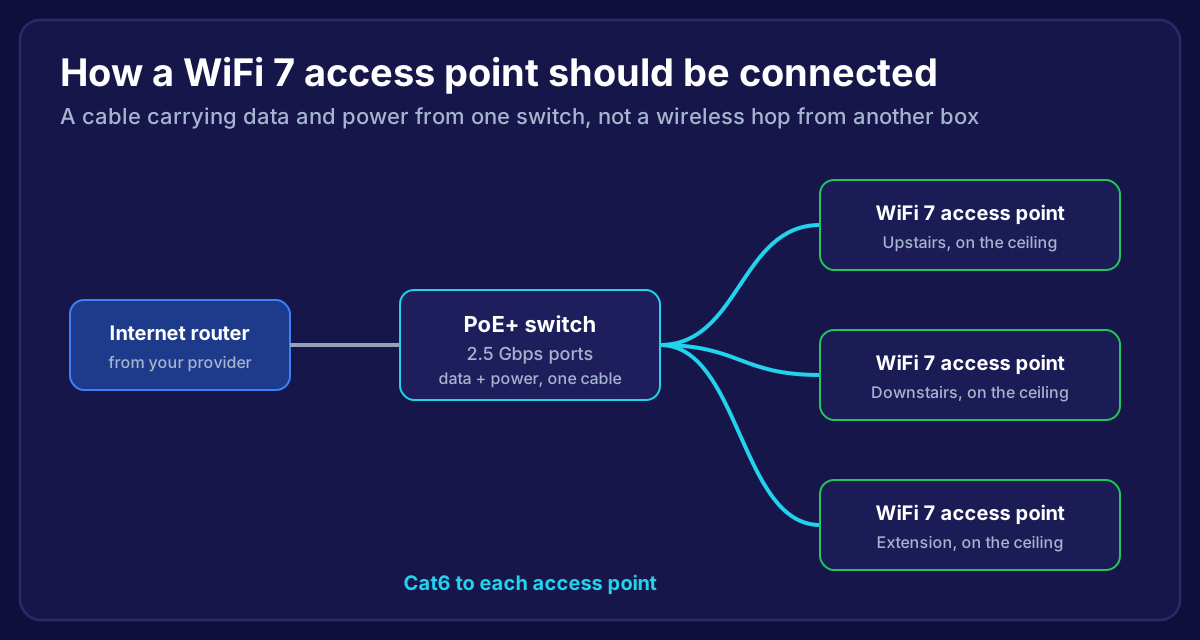 Diagram showing an internet router feeding a 2.5 gigabit PoE switch, which powers WiFi 7 ceiling access points upstairs, downstairs and in an extension over Cat6 cable
What Is a WiFi 7 Access Point?
Your provider's router does several jobs in one box: it connects to the internet, it runs your network, and it makes the WiFi. An access point only makes WiFi. You fit them around the house, wherever the WiFi is needed, and connect each one back to the router with a cable.
A WiFi 7 access point uses the newest standard (also called 802.11be). For a home, the useful parts are:
- The 6 GHz band. Lots of clean airspace, without the congestion of 2.4 and 5 GHz
- Multi-Link Operation (MLO). Devices can use more than one band at once, which makes connections steadier
- Wider channels and more efficient data, for higher speeds close to the access point
We go through whether WiFi 7 itself is worth it in is WiFi 7 worth it for your home. This post is about how it's installed, because that's what decides whether you get those benefits.
Why Installation Matters More With WiFi 7
6 GHz doesn't travel far
The higher the frequency, the less it gets through walls, floors and furniture. 6 GHz has the shortest reach of the WiFi bands. A WiFi 7 router downstairs might give you blistering speed in the hallway and fall back to the older bands everywhere else.
Putting access points closer to where people use the WiFi is the only way to get 6 GHz into more rooms.
Ceiling mounting gives the best coverage
Access points are designed to send their signal downwards and outwards, like a light fitting. On the ceiling in the middle of a floor, they cover the rooms around them evenly, and nothing like sofas, cupboards or people gets in the way.
On a shelf or behind a TV, half the signal is wasted on the wall behind.

A cable beats a wireless hop
Mesh systems link their units together wirelessly. Every bit of data has to cross the air twice: once from your device to the unit, and once from that unit back to the main one. That shares the airtime and adds delay.
A cabled access point sends that second trip down a wire instead. You get the full speed of the access point in that room, steadier video calls and gaming, and no dropouts when the link between mesh units wobbles. Our comparison of extenders, mesh and wired access points covers this in detail.
What a Proper WiFi 7 Install Involves
1. A survey
We walk the house, check the construction (solid walls, foil-backed plasterboard and underfloor heating all block WiFi), and work out how many access points you need and where. Most homes need one per floor, plus one for an extension or garden room.
2. A cable to each access point
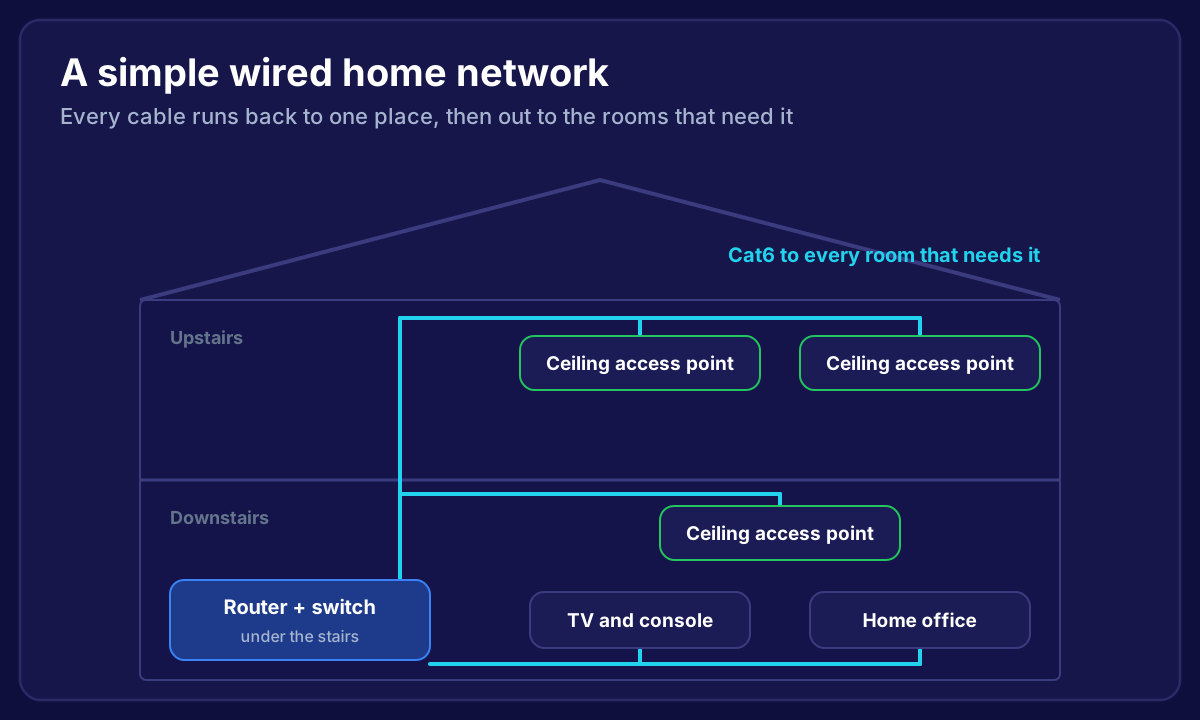
Each access point gets its own Cat6 cable back to the central point. Upstairs, that usually runs across the loft. Downstairs, it runs between the floor joists. See how to install ethernet cable in your house and how to run ethernet cable between floors for how that's done.
3. A PoE+ switch with 2.5 Gbps ports
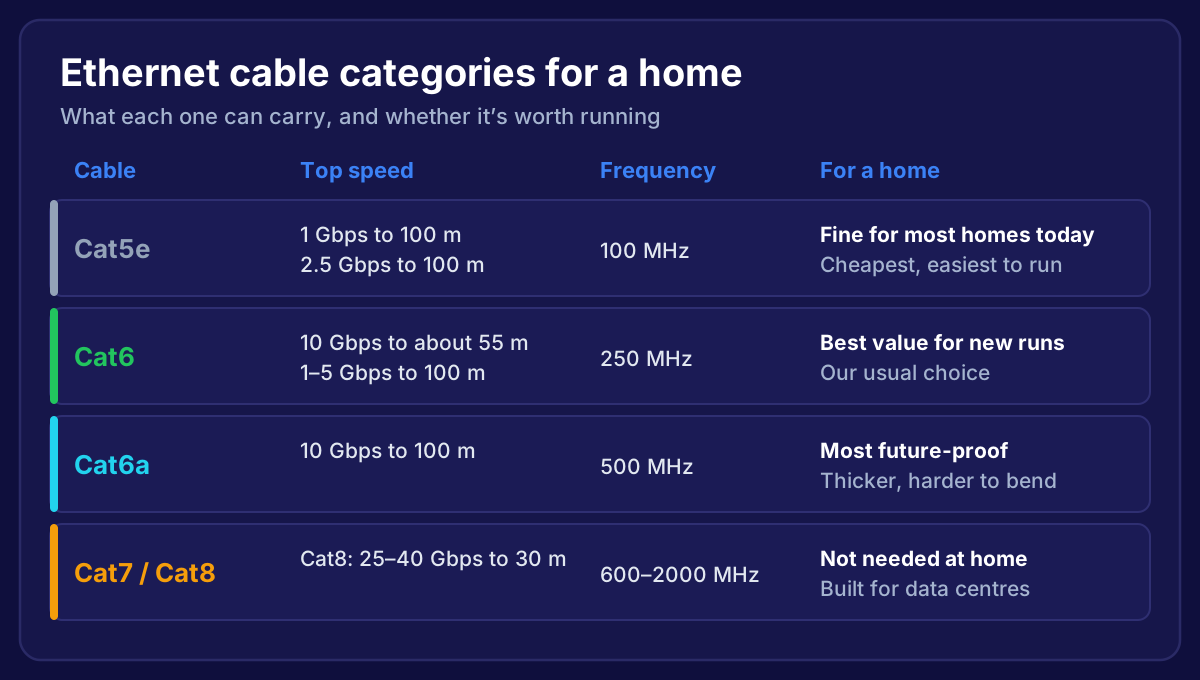
Power over Ethernet (PoE) sends power down the same cable, so there's no plug needed on the ceiling. WiFi 7 access points use more power than older ones, and most need PoE+ rather than basic PoE. Many also have a 2.5 Gbps network port, so the switch should match, or the cable becomes the bottleneck. Cat5e or Cat6 both handle 2.5 Gbps over house distances, as we explain in Cat5e vs Cat6.
4. Setup that suits your devices
We set the access points up as one network with one name, so your phone moves between them as you walk around. We tune the channels and power so neighbouring access points don't fight, and set up a separate network for smart devices and guests, as we cover in our smart home WiFi guide.
5. Testing every room
Finally, we test speed and signal in every room, including the garden if you use it.
Do You Need WiFi 7, or Just Better WiFi?
Honestly, the biggest jump comes from moving from one router to cabled access points, whichever generation they are. WiFi 7 adds more speed and steadier connections on top, especially on newer phones and laptops.
If you're fitting new access points now, WiFi 7 is worth choosing. The cost difference has come down, and the cables we fit today will carry the next generation too.
Frequently Asked Questions
How many WiFi 7 access points does a house need?
Usually one per floor for a typical semi or terrace, and one more for a large extension, a loft conversion or a garden office. Solid stone or brick walls can mean one or two extra.
Can I use my provider's WiFi 7 router with access points?
Yes. The router stays as your internet connection, and the access points take over the WiFi. Often we turn the router's own WiFi off so devices always use the access points.
Do WiFi 7 access points need special cable?
No. Cat5e or Cat6 works. We fit Cat6 for extra headroom. The key is pure copper cable and a PoE+ switch.
Will my older devices still work?
Yes. WiFi 7 access points also run the 2.4 and 5 GHz bands, so every device still connects, just at its own generation's speed.
Is a WiFi 7 mesh kit just as good?
Mesh is easier to set up, but its units usually sit on shelves and link wirelessly. Cabled, ceiling-mounted access points give stronger, steadier WiFi in every room.
Want WiFi 7 that actually reaches every room?
We survey your home, run the cables, fit WiFi 7 access points on the ceiling where they'll work best, and test every room. One fixed price, and if it isn't fixed, you don't pay. We cover homes across Bristol, Bath and the South West.
→ See Our Home WiFi Installation Service
Or talk to a local home WiFi installer about what your home needs.