How to Install Ethernet Cable in Your House: A Step-by-Step UK Guide
Zak
21 November 2026
→ Get Your Home Wired Properly, Book a Free Survey
WiFi gets all the attention, but the homes with the best WiFi almost always have one thing in common: cables in the walls. A cable to the TV, a cable to the home office, and a cable to each WiFi access point on the ceiling.
This guide shows you how to install ethernet cable in your house properly, in the same order we do it for customers. It also tells you honestly where DIY jobs usually go wrong, so you can decide whether to do it yourself or get it fitted.
Key Takeaways
- Plan every run before you drill a single hole
- Use solid-core, pure copper Cat6 for anything going in a wall
- Run every cable back to one central point, usually where the router lives
- Keep data cables away from mains wiring, and never drill blind
- Finish each run on a wall socket, not a plug hanging out of the wall
- Test every cable before you close up the floor or wall
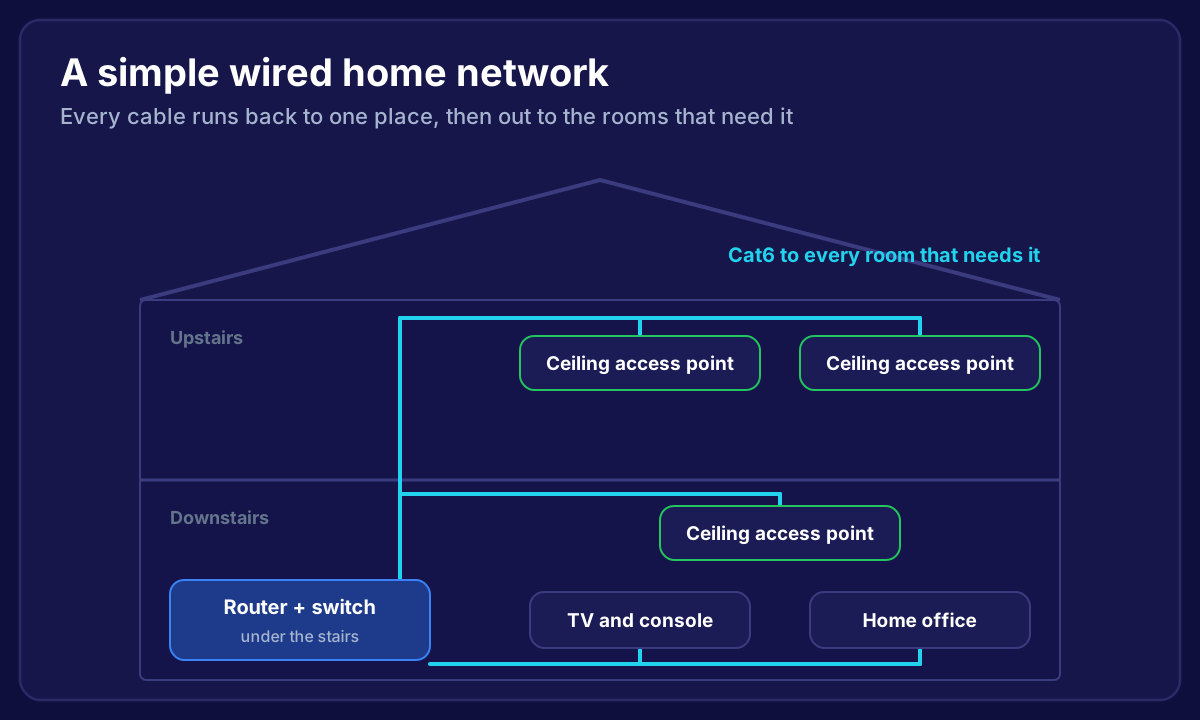 Diagram of a home with ethernet cables running from a router and switch under the stairs to ceiling access points upstairs and downstairs, the TV and the home office
Why Wire Your House at All?
A cable gives you the full speed of your broadband, every time, with no dropouts. WiFi has to share the airwaves with every other device in the house and every network next door.
You don't need to wire everything. The things worth a cable are the ones that don't move:
- WiFi access points. This is the big one. A ceiling access point on a cable gives you strong WiFi in that part of the house, instead of a booster repeating a weak signal. We explain why in WiFi extender vs mesh vs wired access points.
- TVs, consoles and streaming boxes. 4K streaming and online gaming love a stable connection.
- Home office desks. Video calls stop freezing.
- Smart home hubs and security cameras. They go offline less, as we cover in our smart home WiFi guide.
Step 1: Plan Where Every Cable Goes
Walk the house and list every point you want a cable. Then pick one central place where all the cables will end. This is usually wherever the broadband comes in: under the stairs, a hallway cupboard, or a loft.
For each cable, plan a route:
- Upstairs rooms: down from the loft, inside a stud wall or alongside existing pipes
- Downstairs rooms: under the floorboards of the room above, or along the skirting in trunking
- Ceiling access points: across the loft (upstairs) or between the floor joists (downstairs)
Measure each run and add a few metres for slack. The maximum length for an ethernet cable is 100 metres, which almost no house gets close to.
Tip: Run two cables to anywhere important, like the TV or office. Cable is cheap. Lifting a floorboard twice is not.
Step 2: Choose the Right Cable
For a new home installation, use Cat6. It handles today's broadband easily, supports the 2.5 Gbps ports on newer WiFi 7 access points, and costs only a little more than Cat5e.
Whatever category you pick, check two things on the box:
- Solid core, not stranded. Solid core is for runs in walls and floors. Stranded is for short patch leads.
- Pure copper, not CCA (copper-clad aluminium). CCA is cheaper, but it's brittle, doesn't meet the standards, and runs hot when it powers devices like access points.
We go through the differences properly in Cat5e vs Cat6: which ethernet cable for your home.
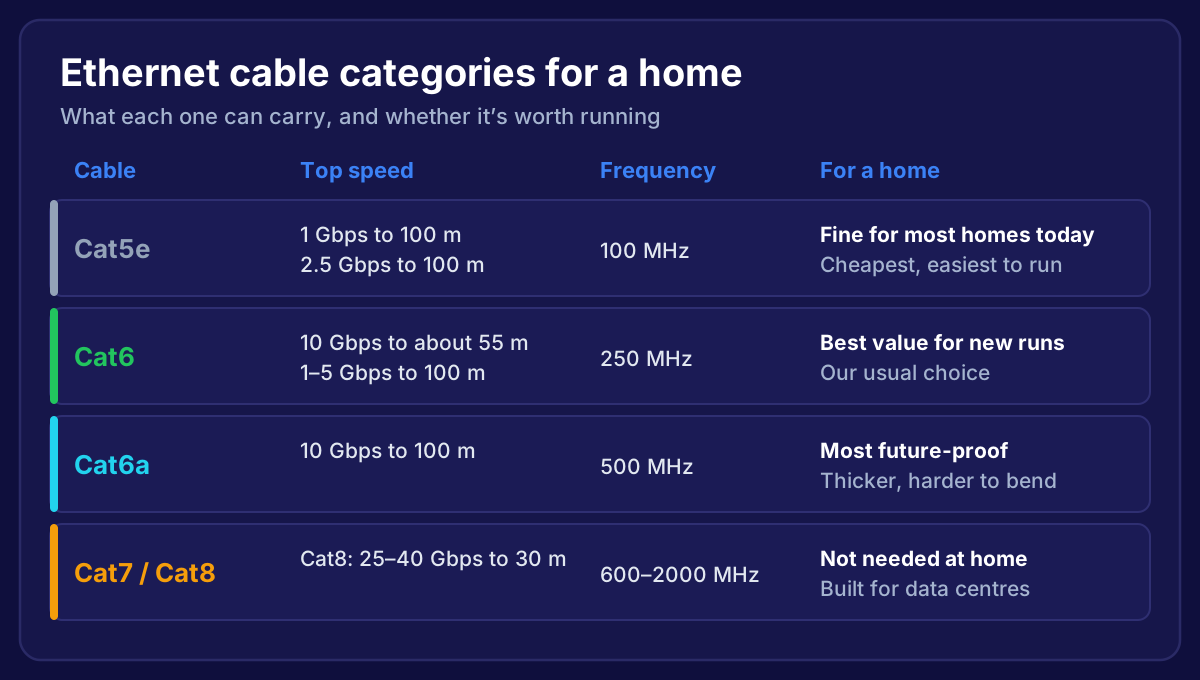 Ethernet cable categories compared: Cat5e, Cat6, Cat6a and Cat7 or Cat8, with speed, frequency and whether each is worth running at home
Step 3: Get the Right Tools
For a typical home job you'll need:
- A cable and pipe detector, so you don't drill into mains wiring or pipes
- A long drill bit and a spade bit for joists
- Cable rods or a fish tape to pull cables through walls and floors
- A punch-down tool (often called a Krone or LSA tool in the UK) for wall sockets
- A cable tester, at minimum one that checks all 8 wires
- Wall boxes, faceplates and modules, and a small switch or patch panel at the central point
Step 4: Run the Cables
This is where most of the time goes. A few rules that keep the cable working properly:
- Don't pull too hard. Pulling harder than about 11 kg (110 N) can stretch the wires inside and ruin the cable's performance.
- Don't kink it. Keep bends gentle, at least four times the cable's thickness.
- Don't staple through it. Use proper cable clips, and don't crush the cable.
- Keep it away from mains cables where you can. If you have to cross one, cross at a right angle.
- Label both ends as you go, so you know which cable is which at the central point.
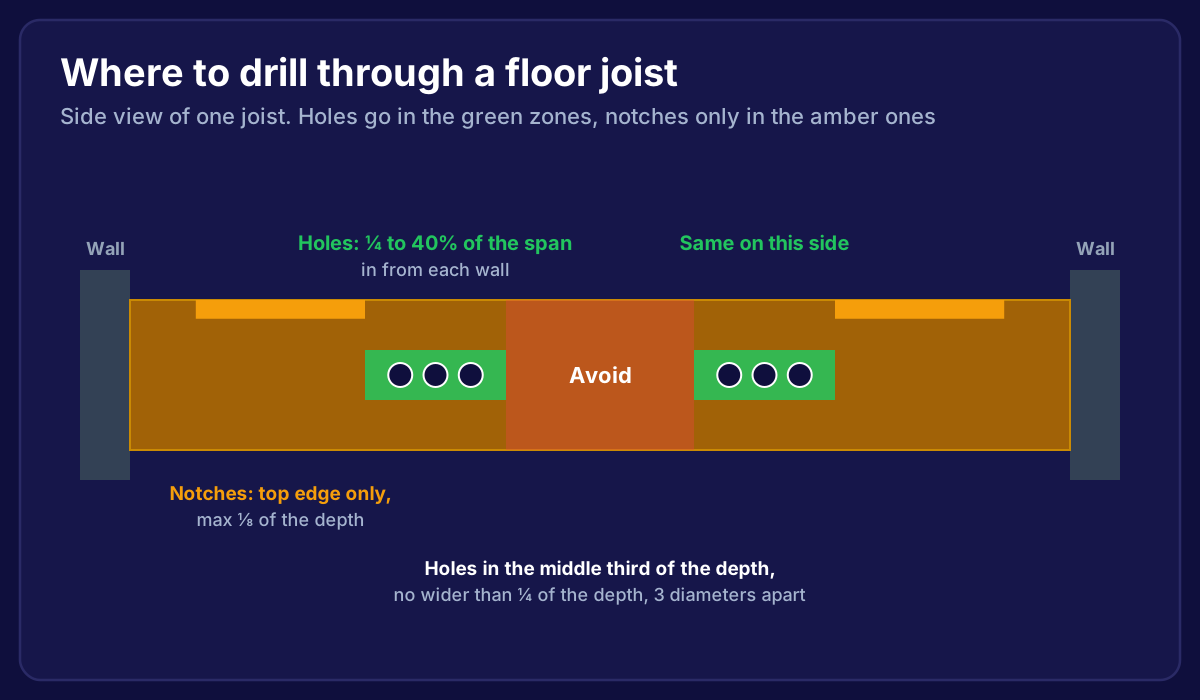
Going between floors is usually the hardest part. We've written a separate guide on how to run ethernet cable between floors, including the rules for drilling through joists safely.
Step 5: Fit the Wall Sockets
Each cable ends on a wall socket (an RJ45 module in a faceplate) rather than a plug. Sockets look tidy, protect the solid-core cable and let you use a normal patch lead to connect a device.
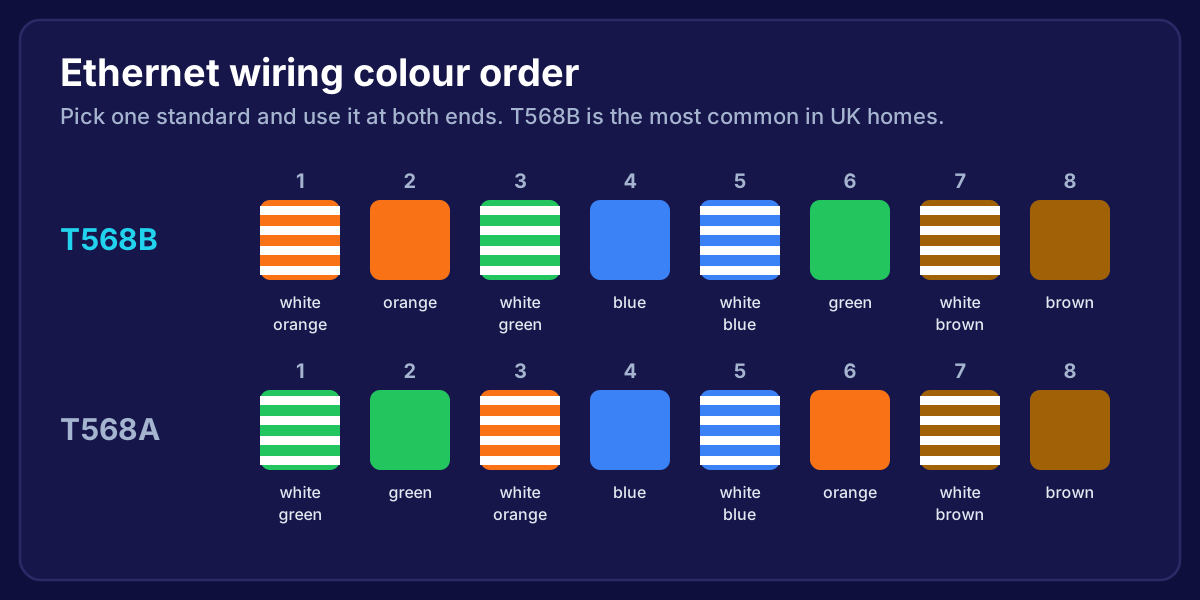
You'll wire the eight coloured wires into the module in a set order, usually the T568B colour order in UK homes. The same order has to be used at both ends. Step-by-step instructions are in how to wire an ethernet wall socket.
Step 6: Connect Everything at the Central Point
At the central point, each cable either goes into a wall socket or a small patch panel, then short patch leads connect them to a network switch plugged into your router.
If you're wiring WiFi access points, choose a PoE switch (Power over Ethernet). It sends power down the same cable, so you don't need a plug socket on the ceiling. Newer WiFi 7 access points usually need PoE+. We explain why in WiFi 7 access point installation.
 Zak from Conxiea giving a thumbs up under a ceiling-mounted WiFi access point he has just fitted
Step 7: Test Every Run
Plug each cable into a tester before you put the floorboards back. A basic tester shows whether all 8 wires are connected in the right order. Then plug in a laptop and check it connects at the speed you expect (1 Gbps or more).
The most common faults we find on DIY jobs:
- Two wires swapped at one end (it might still connect, but slowly)
- A wire not pushed fully into the socket
- A cable crushed under a floorboard or by a staple
Should You Do It Yourself?
You can, if you're comfortable lifting floorboards, drilling safely and taking your time. Data cabling is low voltage, so it isn't notifiable electrical work.
Where it gets harder:
- Solid floors downstairs, which mean surface trunking or careful chasing
- Getting from the ground floor to the loft without visible cables
- Placing the access points, so every room actually gets strong WiFi
That last one matters most. A cable in the wrong place still leaves you with a dead zone.
Frequently Asked Questions
How much does it cost to install ethernet cable in a house?
It depends on the number of runs and how hard the routes are. A single run in an easy route is a small job. Wiring a whole house with access points on each floor is a day or two of work. We give you one fixed price after a free survey.
Can I run ethernet cable next to electrical cables?
Keep them apart where you can and cross at right angles. Never run data cable inside the same conduit or back box as mains unless the box is designed with a separate compartment.
Is Cat5e still OK for a house?
For most homes today, yes. It handles 1 Gbps comfortably and 2.5 Gbps over normal house distances. For new runs we fit Cat6, because the extra cost is small and it gives more headroom.
Can I use ethernet cable outside?
Only cable rated for outdoor use. Indoor cable breaks down in sunlight and damp. For a garden room, see how to get WiFi in a garden office.
How long can an ethernet cable be?
Up to 100 metres in total: 90 metres in the wall plus up to 10 metres of patch leads.
Want a wired home without lifting a floorboard yourself?
We survey your home, plan every cable route, run the cables neatly and fit WiFi access points where they'll actually work. One fixed price, every room tested, and if it isn't fixed, you don't pay. We cover homes across Bristol, Bath and the South West.
→ Book Your Free Home Network Survey
Or talk to a local installer about what your home needs.