Cat5e vs Cat6: Which Ethernet Cable Should You Use at Home?
Zak
21 November 2026
→ Get the Right Cable Fitted, Book a Free Survey
If you're about to install ethernet cable in your house, the first question is which cable to buy. The shelf says Cat5e, Cat6, Cat6a, Cat7 and Cat8, and the higher numbers cost more.
The short answer: run Cat6. It's the best balance of speed, cost and ease of fitting for a home. Here's why, and when you'd pick something else.
Key Takeaways
- Cat5e handles 1 Gbps, and 2.5 Gbps over house distances
- Cat6 handles up to 10 Gbps on shorter runs, and costs only a little more
- Cat6a does 10 Gbps over the full 100 metres, but it's thick and stiff
- Cat7 and Cat8 are built for data centres, not homes
- Solid copper matters more than the number on the box
- The cable is the cheap part. The labour is what you don't want to repeat
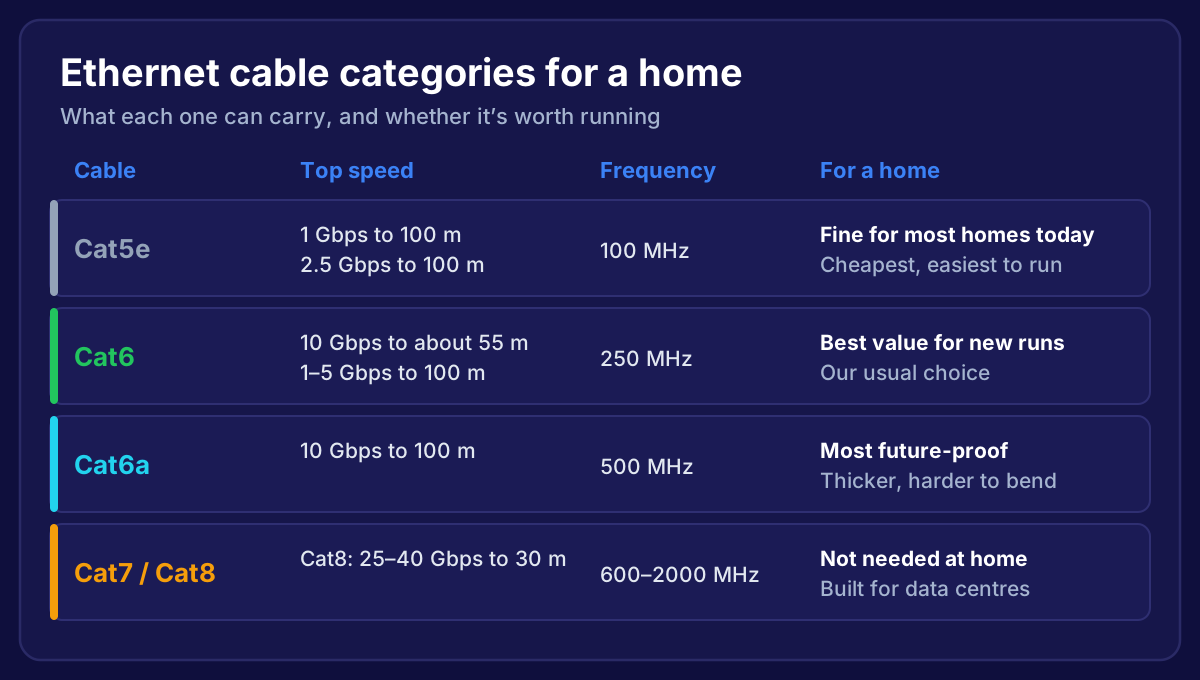 Ethernet cable categories compared: Cat5e, Cat6, Cat6a and Cat7 or Cat8, with speed, frequency and whether each is worth running at home
What Does "Cat" Actually Mean?
"Cat" is short for category. Each category is tested to carry signals up to a certain frequency, measured in megahertz (MHz). A higher frequency means the cable can carry faster connections, or the same speed with more room to spare.
Inside, they all look similar: four twisted pairs of copper wire. The differences are in how tightly the pairs are twisted, the thickness of the copper, and sometimes a plastic divider or foil shield that cuts down interference between the pairs.
Cat5e: Still Fine for Most Homes
Cat5e (the "e" means enhanced) replaced old Cat5 years ago. Plain Cat5 is rarely sold now, so if someone says "Cat5", they nearly always mean Cat5e.
- Tested to 100 MHz
- 1 Gbps up to 100 metres
- 2.5 Gbps up to 100 metres, using the 2.5GBASE-T standard that newer WiFi 7 access points and switches support
If your house already has Cat5e in the walls, there's usually no need to rip it out. It will carry a gigabit broadband connection and a modern access point comfortably.
Cat6: The Best Choice for New Runs
Cat6 is what we fit in most homes.
- Tested to 250 MHz
- 10 Gbps up to about 55 metres (enough for almost any run in a house)
- 1, 2.5 and 5 Gbps up to 100 metres
The cable is slightly thicker than Cat5e, often with a plastic spine inside to keep the pairs apart, but it still bends easily enough to run through walls and floors. It costs only a little more per metre.
Since the labour is the expensive part of any cable job, paying slightly more for the cable gives you headroom for faster broadband and faster WiFi later.
Cat6a: Future-Proof, But Harder to Fit
Cat6a (augmented) is tested to 500 MHz and carries 10 Gbps over the full 100 metres.
The catch: it's noticeably thicker and stiffer. It's harder to pull through tight holes, needs bigger bends, and the modules are bulkier in a shallow wall box. Many versions are also shielded, which means extra care with earthing at the ends.
Cat6a makes sense for long runs, a home lab, or a big house with a cabinet full of kit. For most homes, Cat6 does the same job in practice.
Cat7 and Cat8: Not Worth It at Home
These are the ones that cause the most confusion.
- Cat7 isn't a recognised category in the US TIA standards that most home kit is designed around. Proper Cat7 is fully shielded and was designed for a different connector. A lot of "Cat7" patch leads sold online are fitted with ordinary RJ45 plugs, so you don't get anything extra.
- Cat8 is designed for 25 to 40 Gbps over 30 metres in data centres. It's thick, stiff, expensive, and nothing in a home can use it.
If you see Cat8 sold as a "gaming cable", it's marketing. A good Cat6 lead gives you the same result.

What Matters More Than the Number
Two things cause more problems on home jobs than picking the "wrong" category:
- CCA cable. Copper-clad aluminium looks like copper but isn't. It's brittle, doesn't meet the standards, and gets hot when powering access points over PoE. Always buy 100% solid copper for fixed runs.
- Bad terminations. A Cat6 cable wired badly into a wall socket performs worse than a well-fitted Cat5e one. We show how to do it properly in how to wire an ethernet wall socket.
Which Should You Choose?
| Your situation | Our pick |
|---|---|
| Existing Cat5e in the walls, working fine | Keep it |
| New runs in a normal house | Cat6 |
| Long runs over 55 m, or you want 10 Gbps everywhere | Cat6a |
| Patch leads between devices | Cat6, stranded |
| Anywhere outside | Outdoor-rated Cat6 |
For a full walkthrough of the job itself, see how to install ethernet cable in your house.
Frequently Asked Questions
Is Cat6 faster than Cat5e?
Only if the devices at each end are faster than 2.5 Gbps. For a gigabit broadband connection, both perform the same. Cat6 gives you room to grow.
Can I mix Cat5e and Cat6?
Yes. They use the same plugs and work together. The connection runs at the level of the weakest part, so a Cat6 cable on Cat5e sockets acts like Cat5e.
Will Cat6 make my internet faster?
Not on its own. Your broadband speed sets the limit. What a cable does is give you all of that speed, reliably, instead of losing a lot of it over WiFi.
Which cable do WiFi 7 access points need?
Cat5e works for the 2.5 Gbps ports on most WiFi 7 access points. We fit Cat6 for the extra headroom. More in WiFi 7 access point installation.
Want the right cable, run the right way?
We plan the routes, fit solid-copper Cat6 to every room that needs it, test every run and set up your WiFi access points. One fixed price, and if it isn't fixed, you don't pay. We cover homes across Bristol, Bath and the South West.
→ Book Your Free Home Network Survey
Or talk to a local installer about your home.